Building the ad is the small part of the job.
One application instead of the Animate → After Effects → folder chain. You animate in it, manage assets, watch the weight, ship HTML5, statics and video, and run client approval from the same file. It reads and writes the formats you already use, so nothing you have made becomes unreachable. Every panel is pixel perfect and every icon is drawn by hand.
One animation. Built three times, in three programs.
animated in Animate, a tool that stopped moving forward years ago, published 27 times
the same motion rebuilt in After Effects, by hand, so it never quite matches the banner
the end frame recreated in Photoshop, 34 times, one per size
Three animation engines for one idea. Every change is three jobs, and the three outputs drift apart. ADIMATE builds it once and exports all three from the same file. How texts and assets stay in sync across the whole campaign is A.D.I.'s job.
A real timeline, in the convention you already know.
Keyframes, tweens, easing curves, dragging keys, range selection, guide layers. If you came from Animate, nothing here needs relearning.
Preset animations
Fade, slide, pop, spin in one click, or your own curve.
Movie clips
Nested symbols with their own timeline.
Nine-point anchors
Registration point where you expect it, every time.
Align and distribute
Grid, guides, snapping.
Layer types
Text, shapes, images and video as first-class layers.
Easing editor
Curves you can drag, reuse and name.
Pixel perfect. Every icon drawn by hand.
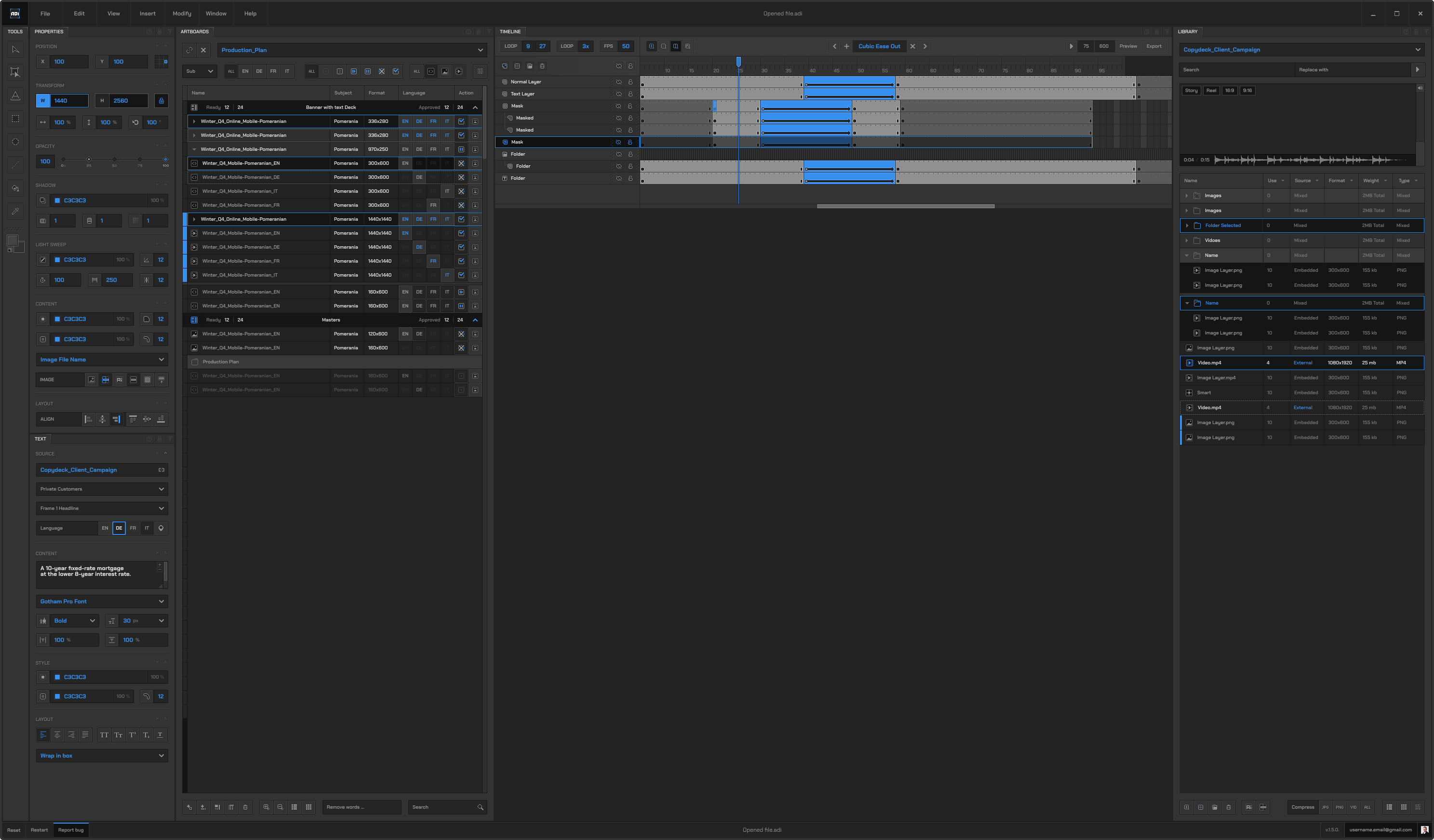
A tool you look at eight hours a day has to be quiet. ADIMATE's interface is built on a 28 px grid from one style guide: five colour families, two type styles, one blue. The 330 icons were not taken from a library; each was drawn for its 16 px box, with its disabled, enabled and active state, so that a toolbar reads at a glance and nothing wobbles between panels.
Tools
Select, transform, text, shapes, fill, pipette. The panel answers the pointer itself: one column, two states per tool, no labels to read.
Text and Properties
The text source is a deck, not a string: client, frame, language. Properties go position, transform, opacity, content, layout, every section collapsible. Same spacing, same field well, same blue.
Artboards and Library
The production plan as a list: every size, every language, its status. The library holds the assets with their weight, a built-in compressor and a search that replaces across the whole plan.
Many artboards in one project. Type decides what exports.
Each artboard is HTML5, video or static. Content scales with the board, responsive mode included. Build the master, duplicate into the rest of the plan.
The other 80 are sizes and languages of something you already made.
Not a file list. Asset management.
Folders, sorting, columns, search and replace. Select a layer and the library highlights the file it came from.
The rules are in the tool, not in a PDF someone forgot to read.
clickTag
Written the way each network expects it, per artboard.
150 KB
Enforced while you work, not discovered at delivery.
Backup static
Generated from the last frame, no separate export step.
Fonts
Embedded, or text converted to outlines so the typography survives on a machine without your typeface.
It works with what you already have.
 .adi
Not "replaces Animate". Reads your files, gives them back.
.adi
ADIMATE saves .adi. A.D.I. reads it as a template.
One file holds the whole production: every artboard and size, the timeline, the library, the text layers bound to the copy deck, the languages. Open it in ADIMATE and keep animating. Drop it into A.D.I. and it becomes a template: A.D.I. feeds it the deck, the brand and the assets, and every size and language comes out of the same file, checked and ready for the preview.
The .adi file is hosted in A.D.I. together with its assets. A change of text, a new packshot or a fresh export happens on the server, from the browser, so nobody on the team needs ADIMATE installed to keep the campaign moving. The person who built the file is no longer the only one who can change it.
The film and the banner cannot drift apart.
MP4 is rendered frame by frame from the same HTML as the banner. There is no second animation engine to keep in sync, because there is no second engine. Video as a background layer under text, target size set in MB.
The PM types. The banners change while they type.
Copy is pasted once from Excel. ADIMATE, After Effects and Figma all read the same deck through their plugins. In video the text is burned into pixels, so it says so, instead of quietly lying.
Drop in the XLS and the project already knows what has to exist.
The .adi file lives with that plan and tells you how many formats are left. Pick where the campaign lives, on disk, in ADI LINK, in Adpiler or in your own system, and the Artboards panel lines your boards up against it: what still has to be made, what is waiting, what came back with feedback.
Language is a dimension of the artboard, not a copy of it.
Twenty files that slowly drift apart is not localisation. Add as many languages as the campaign needs, fix the layout once and every language has it. Override only where one language genuinely needs a different layout.
Your clients, campaigns and files live in ADI LINK. ADIMATE reads them natively.
Every ADIMATE user gets an ADI LINK account. Add a client, a campaign, drop in the media plan, the assets and the texts, and you have everything a banner job needs in one place, without running the whole A.D.I. Open ADIMATE, pick the campaign, and start turning out the resizes with the right texts and assets already at hand. The previews go back to the same campaign as a link.
 ADI LINK · your accountADIMATE · Artboards panel
For the banner freelancer
ADIMATE plus ADI LINK is the whole kit: the editor, and a place for clients, campaigns, plans, texts, assets and previews. Nothing else to set up.
For the agency that does everything
Statics, HTML5 and video across teams, with brands, templates, checks and sign-off: that is A.D.I., and ADIMATE and ADI LINK sit inside it.
The client's "no" lands in your artboard list, with the reason.
Statuses and comments are shared with A.D.I. and ADI LINK, and the agency defines its own set. When a client rejects a file in the preview, the producer sees it as rejected in the Artboards panel the same second, with the comment attached to that board. Fix it, upload from the row, status moves on. No second window, no email to find.
Where this is going.
Templates
Animation templates and deck templates.
Render machine
A deck edit rebuilds the files with no producer at the keyboard.
Client edition
Pick a template, drop in text and a photo, download, without leaving the template.
Copy Check and Brand Check across a whole delivery already exist. They live in A.D.I. and, for statics, in Vadilator.